
Schema-aware editing — completions from a registered schema, the sample
preview and inferred fields — requires Alginte 0.8.0 or newer. Previews
through aggregates and joins, and field access on Protobuf, require 0.10.0.
Roots: key and value
In most expressions two root identifiers are in scope:
key— the record keyvalue— the record value
#,
the standard SpEL convention):
The full table, operator by operator with what each field returns, is on the
SpEL reference.
The editor highlights the identifiers that are valid in the field you’re
editing, and the validator rejects out-of-scope ones with a hint (e.g.
Unknown root identifier: aggValue. Use key, value or #aggValue.).
Reaching into a record: get('field')
Field access on a structured record is value.get('field'), on every format
the builder supports. It is also the only form the completions offer, because
it is the only form that evaluates the same way in the editor and in a
deployed topology.
Two forms that look reasonable and are not:
value['field']— indexing is aMapoperation. It works on JSON and JSON Schema values, whose runtime type is a map, and fails withEL1027Eon Avro and Protobuf — in the preview and deployed alike. The editor rewrites that failure into the rule rather than leaking the runtime class name.value.field— property access is deliberately not enabled (it needs a SpEL accessor that the sandbox does not register).
get('field') hands back is what the deserializer actually produces —
there is no conversion layer, so what you see in the preview is what runs:
- Avro — a
GenericRecord. Numbers come back as real Java numbers, so arithmetic works. Strings come back asorg.apache.avro.util.Utf8, aCharSequence:== 'Kettle'compares content and works, butString-only methods such as.contains(...)need.toString()first — the editor tells you so before you deploy. Writing aUtf8to a JSON sink is handled for you; it lands as a plain JSON string. - JSON Schema and JSON — a
Map.get('field'), indexing and theMapmethods (containsKey,keySet, …) all work. - Protobuf — a
DynamicMessage(since 0.10.0).get('field')returns realStrings and boxed numbers, nested messages thatget()chains through, andLists for repeated fields; unset proto3 scalars return their defaults.
Map answers null. On Avro and
Protobuf an unknown name is always a typo or schema drift, so get('nope')
fails with Not a valid schema field: nope, in the editor and deployed alike.
On JSON Schema it may be an optional property, and the record is a Map
that cannot tell the two apart, so the answer is a quiet null. The editor
covers that case while you type: a literal get('name') whose name is not
among the subject’s declared properties gets a warning on the literal, with
the declared names and the closest one. Watch this if a filter on a JSON
Schema topic seems to drop everything. The per-serde table is in the
SpEL reference.
Before Alginte 0.13.0, Protobuf answered
null for an unknown name, like
JSON Schema. A topology that named a field the schema does not have was
dropping records silently; from 0.13.0 it fails at the first record.Where completions come from
Completions onvalue. (and on key., #aggValue., #leftValue., …) come
from one of three sources, and the editor labels which one it is using:
- A registered schema. Bind a source node to a Schema Registry subject
and every editor fed by that source offers the schema’s fields as typed
calls —
get('customerId') customerId : string. That is a contract: something else asserted it, and it holds for every record on the topic. Binding a subject never changes how records are read; it only informs the editor. - Your own upstream expressions. Past a node that re-types the record — a
map, amapValues, aflatMap— no schema describes the value any more. The editor evaluates the upstream expressions against a real record and offers the fields that came out, marked(inferred): an observation of one sample, not a promise. - Editor type hints. Where nothing upstream can be resolved, the drawer’s
Editor type hints say which type to assume for
keyandvalue. They are local to the editor — not saved, and they never affect the topology.
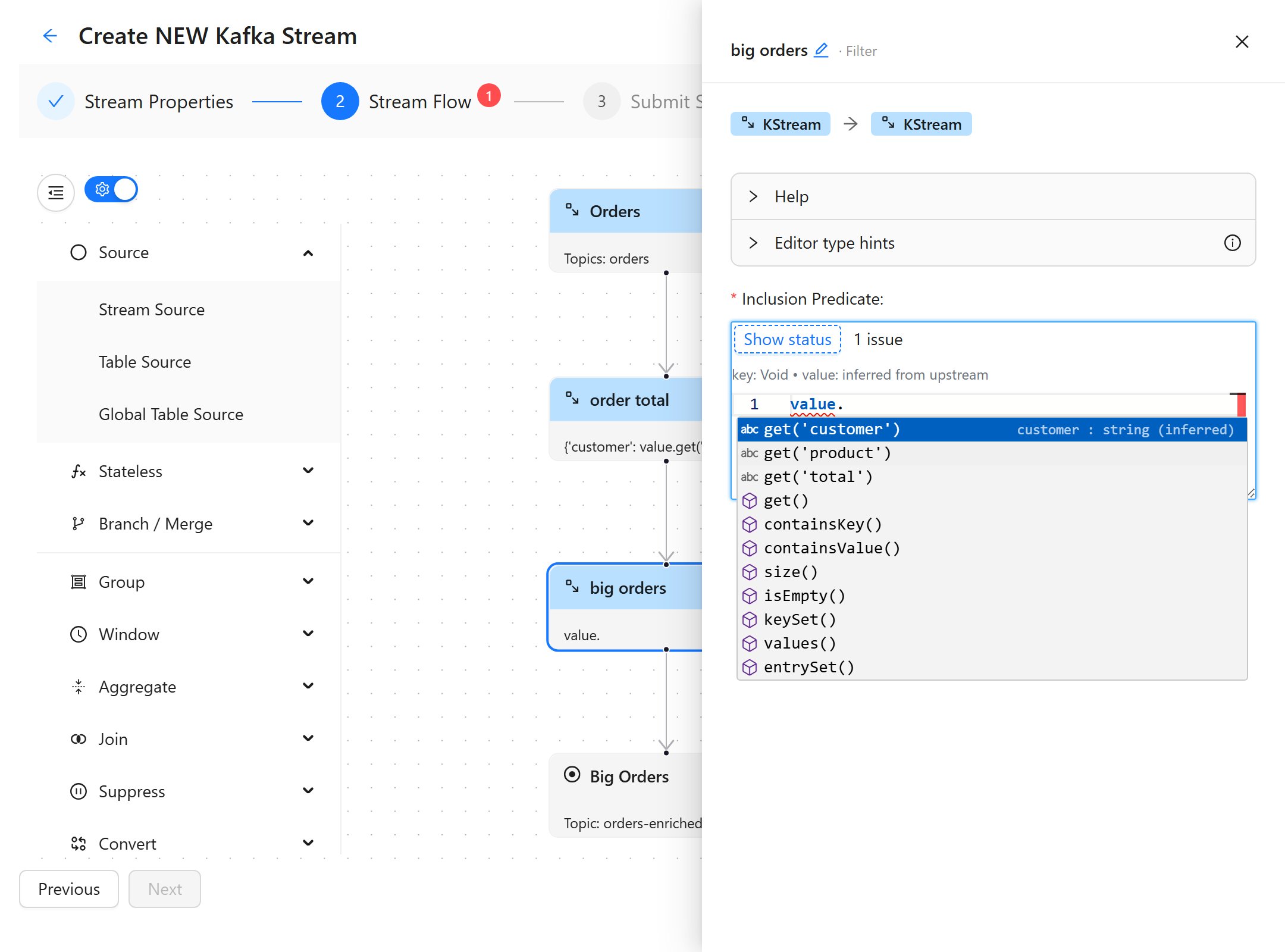
Inferred completions: one node after a mapValues, the filter offers customer, product and total — fields that exist in no schema — with the type hint reading (inferred) and the banner naming the source: value inferred from upstream.
value.get('id').
the editor infers the intermediate type and suggests only what fits.
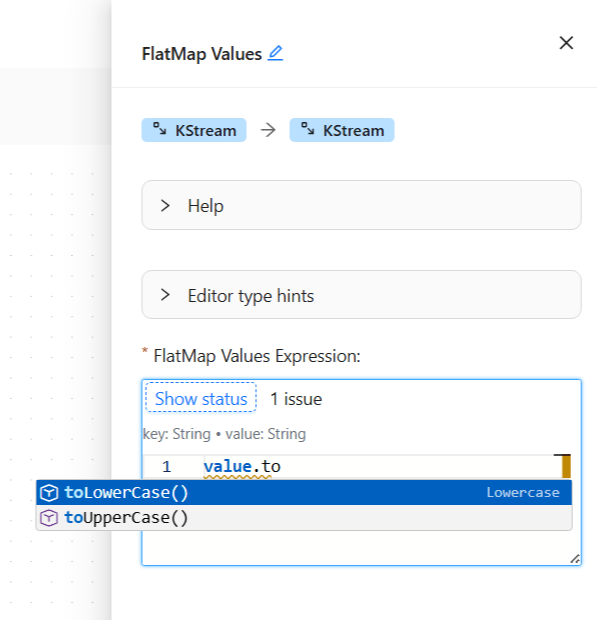
Type-aware completions: a String value offers string methods; the header shows the key/value types in play.
Through aggregates and joins
Since 0.10.0 the knowledge carries through the stateful operators instead of stopping at them:- Aggregate / cogroup are modelled as their first fold: the initializer
builds the accumulator, the adder folds the sample into it, with the same
operators a deployed topology runs.
#aggValueinside the adder is bound to what your initializer built, and everything downstream (toStream → map → sink) previews, completes and validates against the accumulator’s real shape. - Join gets two lanes, one per input.
#leftValueand#rightValueare each bound to their own branch’s record, completions after#rightValue.describe the right record, and the join drawer previews both inputs and the joined output. Nodes downstream of a join get a chain like any other. - Count and reduce need no modelling: count emits
<grouping key, Long>, reduce keeps the value’s shape.
KTable.groupBy and the
foreign-key join — because their output shape is yours to decide. Use the
node’s Declared output section to state the output serde (and a subject,
if the result is itself registered): downstream editors restart from your
declaration. A declaration also wins over an inference anywhere, which is the
escape hatch when a one-record fold does not represent the steady state.
Everything degrades and nothing blocks. Registry unreachable, no subject
bound, an expression that throws, a many-input node — each falls back to
generic completions and an empty preview. None of them stops you typing.
The sample preview
Every drawer has a Sample preview (in → out) section: a record run through your expressions in the same sandbox deployed streams use, showing what arrives at this node and what leaves it. The sample is chosen in this order:- one you type yourself (JSON or plain text) — the override belongs to the chain’s source node, so one story flows through every downstream drawer;
- else the newest real record from the source topic (Resample from topic draws another);
- else a sample generated from the registered schema;
- else a fixed primitive.
real record from 'orders' (partition 0, offset 9) or generated from subject 'orders-value'. A real record is the
stronger evidence: a generated one demonstrates the shape, not your data.
Verdicts you can trust. The status line under the editor (Show status)
reports whether the expression would fail on the sample. The rule is strict:
the editor only claims an expression will fail when every value it touched
was a real sample — never on a placeholder or a hint. That rule is checked
against real deployed topologies by a differential test corpus covering every
expression role, stateless and stateful, so a verdict shown here is one a
deployed stream would give.
A filter that rejects the sample is flagged as a warning and the record is
flowed on anyway, so the shapes downstream stay known.
The editor box is resizable — drag its corner to make room for longer
expressions.
Producing multiple values
flatMap / flatMapValues emit several records from one input. Return an
inline list literal:
Calling Java
Static calls on a small allowlist of safe types are available viaT(...):
Math, Number and the box types (Integer, Long, Double, Float,
Short, Byte, Boolean, Character), String, Map, List, Set,
UUID, and Kafka’s Bytes.
Custom functions
Operators can extend the vocabulary without recompiling Alginte: register public static Java methods (from a JAR on the classpath) underkafka.streams.transformation.functions, and call them as #name(args) in
any expression — with full editor support.
Where to go from here
The SpEL reference & cookbook is the scan-first page: every expression field’s scope, what each serde hands you for key and value, windowed keys, and a recipe per operator with the record before and after, each one a row in the fidelity corpus.From the blog
- SpEL in Kafka Streams: from evaluator to editor: how this editor gets its highlighting, completions and actionable errors out of an evaluator whose tokenizer Spring keeps package-private.