
Available from Alginte 0.14.0.
Declare the service
A design names a service and never carries its address or its credential: those belong to the console that runs the stream, declared in its configuration. One service, in anapplication.properties file:
ALGINTE_SERVICES_JEV_KIND=http-json,
ALGINTE_SERVICES_JEV_BASEURL=https://api.example.com, and so on. The name after services. is
what a design refers to.
The credential is never a property value. auth-value-env names the environment variable that
holds it, and the console reads it when it makes a call, so the key stays out of every design,
download and upload. The console checks every declaration when it starts and refuses to start on
one that could never be called: an unknown kind, a missing or relative base-url, a timeout that
is not positive.
The node
It is in the palette under Stateless, as Enrich from a service (HTTP).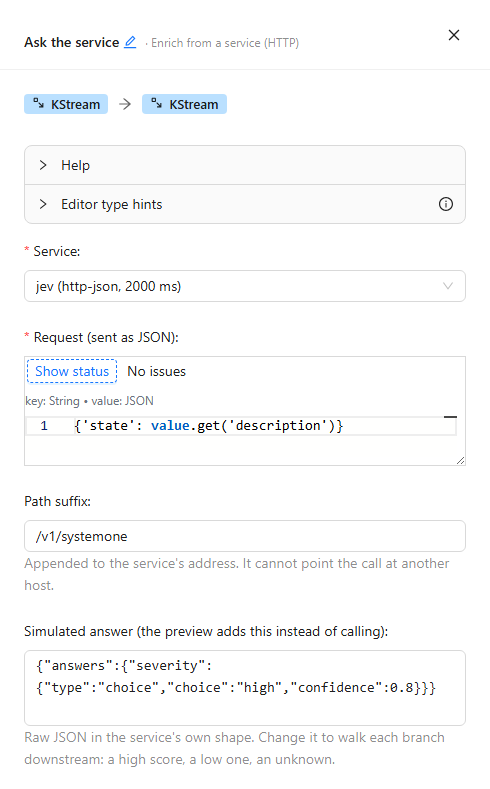
The node's drawer: the service chosen from the console's list, the request it sends, and the simulated answer the preview adds instead of calling.
{"id": "CVE-2026-0001", "description": "heap overflow in the parser"} comes out as
{"id": "CVE-2026-0001", "description": "heap overflow in the parser", "decision": {"severity": "high", "confidence": 0.8}}.
The preview never calls the service
The sample preview and the expression editor never make a call. A preview that called would spend money on every keystroke, need the credential in the authoring console, and could answer the same record differently twice. Instead the node carries a simulated answer, and the preview adds it exactly as the running stream adds a real one — through the same mapping, into the same field — labelled simulated answer so it is never mistaken for the service’s.- Choosing a service fills it in. When the service declares an
answer-exampleand the node has no simulated answer yet, the example is copied into the node. It is saved with the design and travels with a download, as test data. - Change it to walk every branch. A high score, a low confidence, an answer the mapping does not expect, the fallback: paste each one and watch what the nodes after it do. The editor checks the answer mapping against the simulated answer too, so a mapping that reaches into a field the answer does not have is flagged while you write it.
- The request is built, only not sent. It is evaluated on the sample record like every other expression, so a request that would fail on a record fails in the preview.
- An agent gets the same preview. In sandbox mode the MCP tool
evaluate_expressionevaluates an Enrich step with the simulated answer the agent passes, and the step’s note says the answer was simulated. Without one, the answer is null, and the note says that instead.
What the record becomes
The value always comes out as a map, so write it with the JSON value serde:- a map-like value — JSON, JSON Schema, an Avro record, a Protobuf message — has its fields copied and the answer field added. Avro and Protobuf values are copied as their JSON, the same rendering the preview shows;
- any other value becomes
{"value": …, "<answer field>": …}.
When a call fails
The service’sretry-statuses (by default 429, 500, 502, 503 and 504) are retried
with exponential backoff, from 100 ms up to 1 s between attempts, inside the timeout. Any
other status — a 401 or a 422, say — fails the call at once, and so does a connection that
cannot be made. An answer that is not JSON is a failure too.
- Fail the record stops the stream: it shows
ERROR, and its Info tab names the failure with the service and what went wrong, for exampleservice 'jev': answered 422. Fix the cause and Stop/Start it (Deploy & lifecycle); the record is asked about again, since nothing after the last commit was kept. - Add a fallback answer adds the answer you give instead, and the stream carries on. Write it in the service’s own shape: it goes through the same answer mapping as a real answer and as the simulated one, so one mapping serves all three. To see the fallback’s branch in the preview, paste it as the simulated answer.
Throughput, and the poll loop
The call blocks the stream thread until the service answers: a thread makes one call at a time, so at a call of L seconds it handles at most 1/L records a second. More calls in flight need more tasks and more threads: the partitions of what reaches the node, which a repartition before it sets, andnum.stream.threads on the stream.
A thread also has to poll the broker at least every max.poll.interval.ms (300 seconds by
default), and it polls only after it has worked through what the last poll returned. With slow
calls, that whole batch has to fit: keep max.poll.records times the node’s timeout under
half of max.poll.interval.ms. The whole interval is the limit itself; the half leaves room
for what the arithmetic leaves out, such as the commit’s own time. With the defaults, 300
seconds and 1,000 records, and a 2-second timeout, that means max.poll.records at 75 or less:
the interval divided by twice the timeout. A thread that falls outside it is taken out of the
group and its work since the last commit is done again. Both settings go on the stream’s
properties.
The node’s drawer does this arithmetic for you. Under Throughput it shows the calls the node
can have in flight at once, and where the number comes from: the partitions of the repartition
before it, or of its input when there is none, up to num.stream.threads. With no repartition
before the node, Add a repartition before this node puts one there, with no partition count
yet, and opens it so you can set one. Below the number come the node’s warnings, each with a
button that sets the stream property it names.
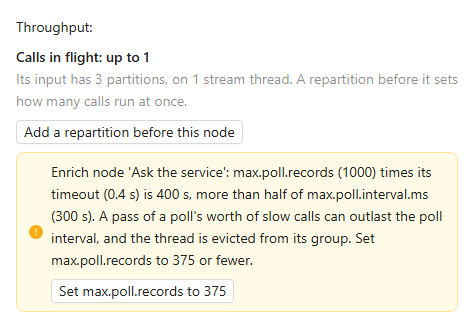
The drawer's Throughput section: one call in flight, and a warning that 1,000 records a poll at a 400 ms timeout is too much for the poll interval, with its fix.
- The poll interval:
max.poll.recordstimes the node’s timeout is above half ofmax.poll.interval.ms. The fix setsmax.poll.recordsto the interval divided by twice the timeout. - The stream threads: the repartition before the node has more partitions than
num.stream.threads, so fewer calls are in flight than it allows. The fix setsnum.stream.threadsto its partition count.
What Submit refuses
Besides the fields the drawer marks as required, Submit refuses an Enrich node whose service this console does not declare — a design uploaded from another console is the usual case — and one whose service declaresmodifies-data=true, naming the node and the service. The services this
console declares are also listed at GET /api/kafka-streams/enrich-services.
The Submit Stream step checks the design as soon as you reach it, before you press Submit,
and again after each fix. It lists what Submit would refuse and the throughput
warnings, each with its fix. A warning never blocks the deploy.
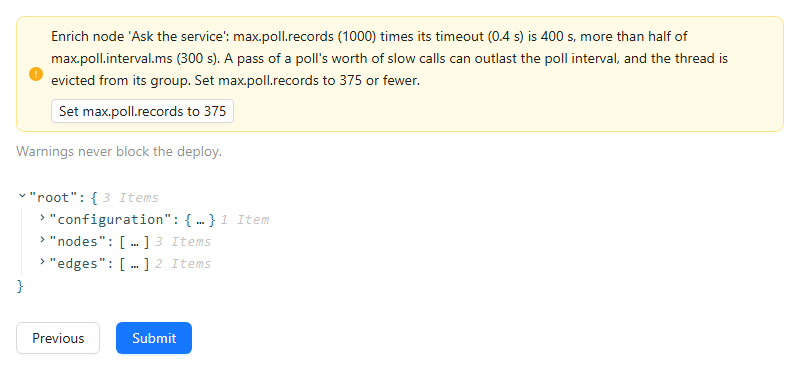
The Submit Stream step, checked on arrival: a throughput warning with its fix, above the design and the Submit button.
Limits
- Services that modify nothing. A stream repeats a call after an error, and repeats the calls since its last commit after a restart, so a call that wrote would write again.
- HTTP with JSON is the only kind of service so far.
- On a stream, not a table. The node takes a KStream.
- One call per node. A step that needs two services is two nodes, each with its own simulated answer and its own timeout.